
AWS Cloud Resume Challenge
Welcome to my Cloud Resume Challenge experience! This is the first part of a three-part series where I'll share everything I learned while building a serverless resume website on AWS. If you're thinking about taking on this challenge, I hope my journey helps you navigate through the process.
My Cloud Resume Challenge Journey - Part 1: Building the Foundation
Introduction
Welcome to my Cloud Resume Challenge experience! This is the first part of a three-part series where I'll share everything I learned while building a serverless resume website on AWS. If you're thinking about taking on this challenge, I hope my journey helps you navigate through the process. 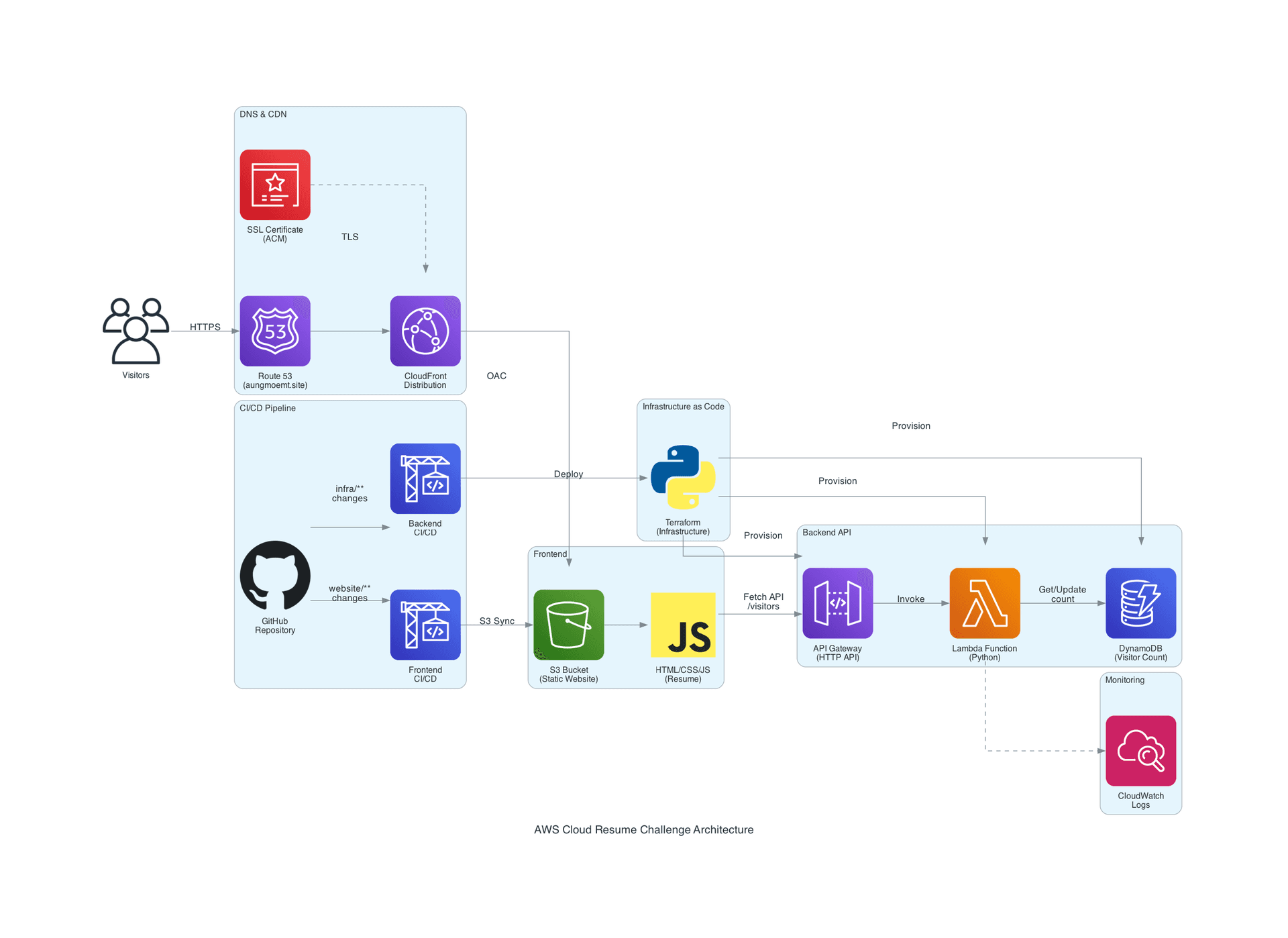 Cloud Resume Architecture
1. Certification
Before diving into the technical implementation, I already had my AWS Solutions Architect Associate (SAA) certification. This gave me a solid foundation in AWS services, which proved invaluable throughout the project. If you're new to AWS, I'd recommend getting familiar with the core services first.
2. HTML
The first step was creating a simple resume website using HTML. Nothing fancy here - just a clean, professional layout that showcases my experience and skills. The goal was to have a solid foundation before adding the dynamic features.
3. CSS
Next, I added CSS styling to make the resume look more polished and professional. Good styling makes a huge difference in how your resume is perceived, so I spent time making it visually appealing while keeping it readable and accessible.
4. Static Website
This is where things got interesting with AWS services:
- S3 Bucket Configuration: I created an S3 bucket and initially blocked public access (we'll use CloudFront for public access later)
- Static Website Hosting: Enabled static website hosting on the S3 bucket for initial testing
- Testing: This setup allowed me to test the basic functionality before adding more complex components
5. DNS
Setting up a custom domain was crucial for making this feel like a real production website:
- Domain Purchase: Bought a domain from Namecheap (
aungmoemt.site) - Route 53 Setup: Configured nameservers to point to Route 53 for DNS management
- CloudFront Distribution: Created a CloudFront distribution with S3 as the origin
- Custom Domain: Added
aungmoemt.siteas an alternate domain name (CNAME) to the CloudFront distribution - DNS Records: Set up an A record with alias mode pointing to the CloudFront distribution
6. HTTPS
Security is paramount, so implementing HTTPS was a must:
- OAC Setup: Disabled static website mode on S3 to use Origin Access Control (OAC) for better security
- S3 Bucket Policy: Configured OAC policy so S3 only allows access through CloudFront
- SSL Certificate: Requested a TLS certificate for
*.aungmoemt.sitein AWS Certificate Manager- Important: The certificate must be in the US East (N. Virginia) region for CloudFront compatibility
- Added CNAME record for DNS validation
- CloudFront Configuration: Added the TLS certificate to the alternate domain name settings
- HTTP Redirect: Configured automatic redirect from HTTP to HTTPS
This is Part 1 of 3 in my Cloud Resume Challenge series. Continue to Part 2 →